Internet phone with the possibility of conference call and ICQ for instant messaging. For normal connection is sufficient dial-up connection. Of the features of Gizmo Project is worth special mention the ability to configure the connection quality depending on the width of the transmission channel, record a call option with one click, as well as displaying on a map the location of the interlocutor.
Top 10 things to do first with your new ***: 1. Invite friends, talk free. Use our Gizmo e-cards to invite your friends to download Gizmo. 2. Play a game of blackjack. 3. Search for friends. 4. Make free CallOut calls. 5. Call with a purpose. 6. Record a call. 7. Map a call. 8. Jump in the party line. 9. Free voicemail. 10. Fill out your profile and pick an avatar.
Top 10 things to do first with your new ***: 1. Invite friends, talk free. Use our Gizmo e-cards to invite your friends to download Gizmo. All Gizmo members talk for free. In the future, to invite more friends, just click the invite button near the bottom of the Gizmo application. 2. Play a game of blackjack. With the tellme line, you can interact with an amazing system to get the weather, news, stock quotes, movie info or even play a game of blackjack. Just dial TellMe from your Gizmo phone. 3. Search for friends. Finding your friends using Gizmo Project is easy, there is a quick member search right in your Gizmo Project main application window. 4. Make free CallOut calls. We give each new *** 25? of free CallOut credit so you can test the ease and quality of making calls from Gizmo to the old phone system. That is enough credit to make over 10 minutes of calls to people in the US. 5. Call with a purpose. Gizmo Project allows you add a call subject which will be displayed in the incoming call window of the person you are calling. Plus, the call subject is saved and displayed in your call list, so it is easy to find a call later. 6. Record a call. You can record any call on your Gizmo Project phone with the click of a button. The call record button is in the active call window, next to the mute and hold buttons. 7. Map a call. When you call other Gizmo members, you can click the Map It feature to see where they are and where you are. How far away can you call for free? 8. Jump in the party line. Our free conference calling server is always available to you. If you want to jump into a conference room of other Gizmo users, just dial partyline and check out who else is there. 9. Free voicemail. Each *** comes with free voicemail, which is delivered to your email ***. Learn how to configure your voicemail. 10. Fill out your profile and pick an avatar. Just click edit my profile from the home tab and fill out your profile and pick the perfect avatar to capture your personality. When others add you to their address book and receive calls from you, your avatar will display.
Year: 2009 OS: Windows 2000/XP/Vista Language: English License: Freeware Size: 13.29 Mb
Damien and Leito return to District 13 on a mission to bring peace to the troubled sector that is controlled by five different gang bosses, before the city's secret services take drastic measures to solve the problem.
Decepticon forces return to Earth on a mission to take Sam Witwicky prisoner, after the young hero learns the truth about the ancient origins of the Transformers. Joining the mission to protect humankind is Optimus Prime, who forms an alliance with international armies for a second epic battle.
Aarav "Sarkar" Malhotra (Akshay Kumar) runs a fishing company in the Bahamas, in which Sagar "Sethji" Singh (Sanjay Dutt) is a diver. While Aarav has done well for himself, Sethji is under a financial crisis. To help him, Aarav advises Sethji to retrieve the lost treasure of a sunken ship called "Lady in Blue". However, Sethji refuses to go to the ship as he has a haunted past with the ship.
Download the Scorpion King 2 2008 Rapidshare (2008)
When young Mathayus witnesses his father's death in the hands of the king, his quest for vengeance transforms him into the most feared warrior of the ancient world.
1)Right click on the Google Talk shortcut. 2)click on Properties. 3)Go to Shortcut tab on Google Talk Properties window. 4)On the Target textbox, add in the /nomutex to the end of the line so that it looks like below (or you can simply copy and paste the below syntax and replace the original). “c:\program files\google\google talk\googletalk.exe” /nomutex 5)Click on OK.
I didn't have to do anything after this nd clicking on the shortcut multiple times just gave me different google talk window.
Alternative
To create a new shortcut for Google Talk:
1)Right-click on the desktop or anywhere you want to place the GTalk shortcut. 2)Select New on the right click context menu. 3)Then select Shortcut. 4)Copy and paste the following line to the text box when prompted to type the location of the item: “c:\program files\google\google talk\googletalk.exe” /nomutex
5)Click on Next. 6)Give the shortcut a proper name such as Google Talk or Google Talk Multiple or Google Talk Polygamy. 8)Click OK until you are done.
How to better protect your computer without any antivirus or antispyware program?
Date: Nov 08, 2009
Every user is concerned about security when accessing the Internet, it downloads, access emails and installs programs. There are several security mechanisms that help to prevent users from virus attacks and hackers. The famous anti-virus, anti-spyware is a form of security used by most users, but also the sandbox, little known but very effective.
When a program is installed and run are stored in the computer we call logs, or the paths and actions taken by the program during its execution. This can be dangerous, because some viruses try to find the logs failures in implementing programs and utilize them to invade and damage your computer.
Sandbox is security mechanism that creates a virtual space in which all changes to files, settings and downloads are performed intercepted and, after restarting the computer, they are erased from the disk.
You can, for example, download programs that make your computer slow or even damage the machine and run them in virtual environment without any problems. If something unexpected happens, just restart the computer and all information generated by the program will be cleared and everything returns to its normal operation.
Where to find Sandbox programs
There are few sandbox programs such as Sandboxie (download Sandboxie) and Virtual Sandbox, which allows you to run any program installed on your computer, including browsers like Firefox, Internet Explorer, Safari, Google Chrome, etc…
Anti-VirusGet complete protection from the most dangerous threats on the internet - worms, viruses, trojans, spyware, and adware. Antivirus and antispyware protection for Windows from the world’s most trusted security company. Use the Internet with confidence in your home or small office.
AVG Antivirus is one of the most complete programs we have found to date. It includes many new options to make it one of the most effective virus scanners on the market. It is still plagued by horrible slowdowns at times. Even things so simple as just typing an IM can be stopped for several seconds for some reason. If you can get passed the occasional slowdowns of your computer, the scanning functionality of AVG Antivirus 8 is top of the line. With the rewrite of the scanning engine, AVG includes multi-processor support. That dual core processor you bought is actually going to start getting a workout now. AVG also includes support for Windows Vista and the 64 bit versions of Windows XP and Vista.
* Easy to download, install and use * Protection against viruses, spyware, adware, worms and trojans * Real-time security while you surf and chat online * Top-quality protection that does not slow your system down * Free support and service around the clock and across the globe * Compatible with Windows Vista and Windows XP
FEATURES:
Integrated protection * Anti-Virus: protection against viruses, worms and trojans * Anti-Spyware: protection against spyware, adware and identity-theft * Anti-Rootkit: protection against hidden threats (rootkits) * Web Shield & LinkScanner: protection against malicious websites
Easy-to-use, automated protection Real-time protection, automatic updates, low-impact background scanning for on-line threats, and instant quarantining or removal of infected files ensures maximum protection. Every interaction between your computer and the Internet is monitored, so nothing can get onto your system without your knowledge. AVG scans in real time: * All files including documents, pictures and applications * E-mails (all major email clients supported) * Instant messaging and P2P communications * File downloads and online transactions such as shopping and banking * Search results and any other links you click on
Internet use with peace of mind The new web shield checks every web page at the moment you click on the link to ensure you’re not hit by a stealthy drive-by download or any other exploits. All links on search results pages in Google, Yahoo, and MSN are analyzed and their current threat level is reported in real time before you click on the link and visit the site.
The best Windows protection - trusted by millions of users AVG’s award-winning antivirus technology protects millions of users and is certified by major antivirus testing organizations (VB100%, ICSA, West Coast Labs Checkmark). View all AVG awards & certifications
CardRecovery is a useful and one of the leading photo recovery software for digital memory card used by digital camera.
CardRecovery can effectively recover lost, deleted, corrupted or formatted photos and video files from various memory cards. CardRecovery supports almost all memory card types including SmartMedia, Compact Flash CF, Secure Digital Card SD, Memory Stick, MicroDrive, xD Picture Card, Multimedia Card MMC and much more. CardRecovery, the award-winning digital photo recovery software is the reliable solution for digital image recovery, digital picture recovery, digital media recovery, photo rescue, photo restore, data recovery, or whether files were deleted, the storage was damaged or formatted.
Our unique and exclusive SmartScan technology completes those impossible recovery tasks that other software cannot touch -- SmartScan quickly locates and restores files that other recovery software could never find.
Features of "CardRecovery": · Recover deleted photos from memory cards. · Recover lost photos from memory cards. · Recover photos from formatted memory cards. · Recover photos from damaged, unreadable or defective memory cards. · Recover pictures from removable storage including floppy disks, Zip disks etc. · Recover images, audio/video, MP3/MP4 files from cellular phones, MP3 players, PDAs.
Is Coping And Pasting Taking Your Valuable Time Away...... DOWNLOAD 'Coping Speed Increaser'
Make Your Coping Faster Than Ever
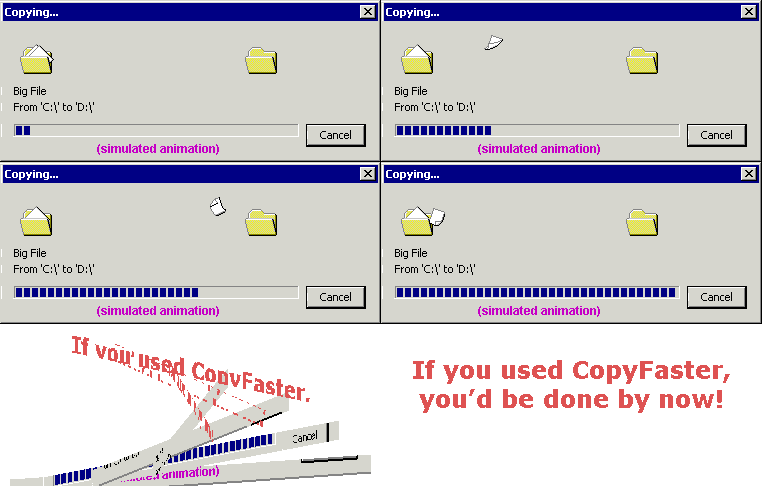
Are you getting the best performance out of your system? Let CopyFaster bring out the best in your hard drive! CopyFaster is a software utility that enables Windows Explorer to copy big files faster when copying to and from the same hard drive.
CopyFaster is faster because:
Less seeking - CopyFaster?s finer control over the copying process causes less time-consuming movement of the hard disk head. CopyFaster will try to read from the same section of the hard disk (where the head is positioned) multiple times before causing the head to move to another position (which is time consuming).
Uncached file access - CopyFaster bypasses Windows 2000?s file cache which normally speeds up repeated access to the same file, but is less useful for big files. Bypassing the file cache prevents extra wasted memory-to-memory copying from occurring.
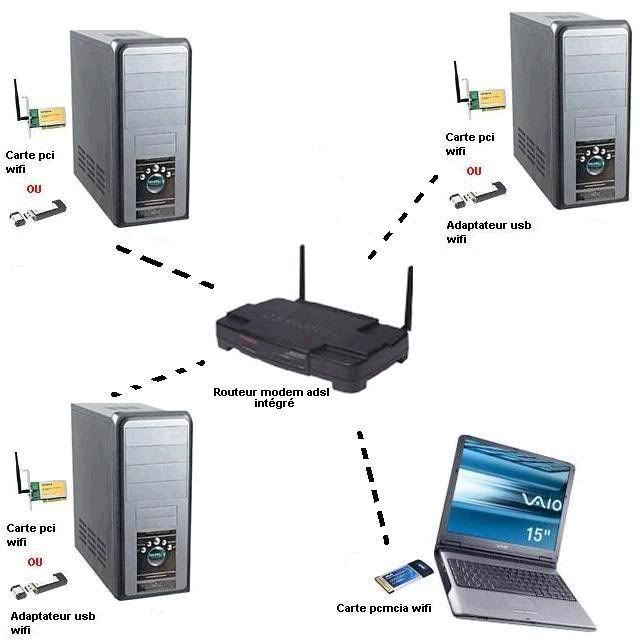
This way of circumventing encryption WEP for wireless was developed and explained by agents of an American organizacación recognized. Demonstrating that you can crack a wireless network in less than 3 minutes with the right tools.
No better way to protect a folder or a file as easy as Hide Folders 2009 does!
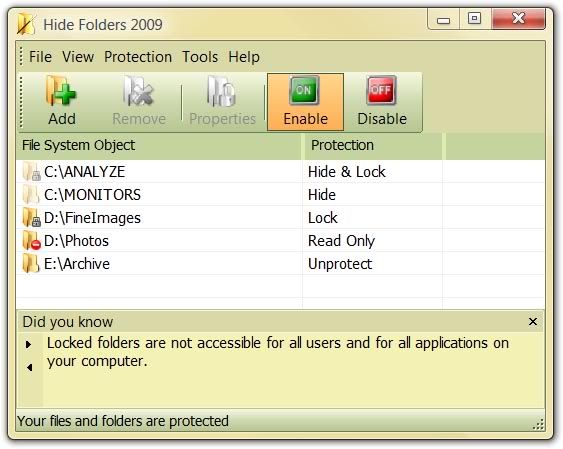
With Hide Folders 2009 you can easily protect any number of folders and files on your computer. You can select any file or folder to protect from the program, drag-and-drop the desired files and folders from Windows Explorer into the Hide Folders 2009 window or protect the file or folder using Windows Explorer context menu.
Features and benefits
* Effective protection methods allow you to hide folders out from users and applications in Microsoft Windows XP and Windows Vista * Nobody but you will access your hidden folders. * 4 protection methods available: Hide, Lock, Hide & Lock, Read Only * NTFS, FAT32 and FAT volumes are supported. * File masks support. * Unlimited number of folders can be protected at the same time. * Trusted processes support - processes which are permitted to access the protected data. * No file system structure modifications will occur. * Effective password protection when running program. * Effective password protection when uninstalling program. * Removing Hide Folders 2009 folder from the system will not uncover hidden folders. * Files from hidden folders will not be lost even if someone tries to remove an upper-level folder. * Clear recent documents option. Hide Folders 2009 clears records of recently accessed documents if these documents reside in the hidden folders. * Clear Recycle Bin items originally located in hidden folders. * Secure Hide Folders 2009 by removing itself from the list of mostly used programs (Windows start menu). * Secure Hide Folders 2009 by removing itself from Add/Remove software Control Panel applet. * Hide Folders 2009 will not hide your Windows, Windows System folders and Windows partition root folders - so careless using of Hide Folders 2009 would not bring the system down. * True stealth mode - you cannot detect the program with Windows Task Manager. * Safe mode support - The folders can be hidden even if your computer is running in safe mode. * Hot keys to manage basic Hide Folders 2009 functions. * Command line support of all main Hide Folders 2009 functions. * Support of folders named with national language symbols . * Hide Folders 2009 is multilingual software, its user interface supports different languages and can be easily translated to new languages. * Intuitive and extremely easy-to-use user interface with visual styles support.
Difference from internal Windows data protection features
A lot of advanced users believe that Hide Folders 2009 (as well as any other third party folder protection software) is useless because Windows has integrated file and folder lock features.
Well, indeed, you can lock folders with Windows XP/Vista and this folder will be inaccessible by the other (unauthorized) users. But there are some annoying limitations that you should be aware of:
1. Windows allows you to lock files and folders on NTFS volumes only. FAT and FAT32 are not supported. 2. It is impossible to hide folder or file with standard Windows facilities. Only file and folder lock is possible. 3. There is no way to make folder invisible but accessible which is helpful for different security tasks like logging, private data recording, backing up etc. 4. A system administrator can easily get access to the locked folders and files. 5. Windows XP home edition doesn't have a user interface to protect files and folders. 6. There is no files and folders password protection in Windows (except the password you provide during Windows logon) - as soon as an authorized user authenticate himself by logging on, s/he get access to the protected files and folders. If you share your account with the another users then you can't exploit Windows folder protection features.
Hide - When you enable protection, the protected file or folder will not be visible to a user, but it will be possible to access it if you know the path to the object. This may be helpful when you want to hide application folders but allow to run the applications from these folders. E.g. you may hide Hide Folders 2009 application folder so nobody will know about it, but if you type from the command prompt "C:\Program Files\Hide Folders 2009\hf.exe", Hide Folders 2009 will run.
Lock - the protected file or folder will be visible but not accessible. It is similar to built-in protection of Windows NT-based operating systems on NTFS volumes. You can not use this protection method for Windows, System and Hide Folders 2009 application folders.
Hide & Lock - The protected file or folder will not be visible to a user and it will not be possible to access them. You can not use this protection method for Windows, System32 and Hide Folders 2009 application folders.
Read only - You can access the protected files and folders, but you cannot modify them. If you protect folder contents (using asterisk wildcard), you cannot copy files into the folder.
No protection - If you choose this method, your file or folder will remain unprotected.
Trusted processes
Sometimes you may want some "trusted" applications have access to the protected data. This may be helpful for antivirus and backup software. Hide Folders 2009 lets you set a list of trusted processes that have an unlimited access to the protected files and folders.
New password protection mechanism
It is very easy to protect files and folders with a password. Just specify your own password for opening Hide Folders 2009 and nobody but you will access your hidden files and folders! This password also protects Hide Folders 2009 from unauthorized uninstall. Unlike previous versions of Hide Folders software, it's impossible to reset the password using third-party tools.
Stealth mode - Hide a folder and nobody will know about it
It is possible to remove all the tracks of Hide Folders 2009.
When Hide Folders application is not running, hidden files and folders are invisible anyway. Moreover, you can remove your Hide Folders 2009 application folder and the hidden files and folders will stay invisible. Fantastic?! Just try it - it's free!
When you quit Hide Folders, it can clear links to protected files from My Recent Documents folder, clear Recycle Bin file and folders that were protected before deletion and remove Hide Folders application from the mostly used programs list.
Moreover it is possible to hide uninstall information about Hide Folders 2009 software and hide folders even in Windows Safe mode.
Visual styles to change look and feel.
We beleive that modern software products must have not only friendly user interface, but also an attractive look. Hide Folders 2009 allows you to change look and feel of the program and adjust it in accordance with your own preferences.
As flexible and advanced as you want it to be
During the development process of Hide Folders 2009 we discussed and considered every detail. Our users offered some of them, so we made the program as flexible as it was possible:
* You can assign hot keys to basic Hide Folders 2009 actions. * You can set a list of programs which are allowed to access the protected data. * You can protect files by mask (e.g. protect only HTML files on your computer). * You can change the default behavior of standard Microsoft Windows actions (Close window, minimize window). * You can add Hide Folders 2009 into Windows Explorer context menu to hide and lock a file or folder easy even when the program in not running. * Hide Folders 2009 is Windows Desktop search aware. * Hide Folders 2009 is multilingual software %u2013 it can be easily translated into new languages. * Command line options allow to use Hide Folders 2009 from other software, scripts etc.
Safe and reliable - Hide files and folders safely
Any system and security utilities require more accurate work because such kind of software can easily make the system unstable. A great number of testers are testing our software to make sure that it will not be a reason of data loss.
In compare with other folder protection software, Hide Folders XP gives you the following benefits:
* Hide Folders 2009 is fully compatible with Windows XP and Vista (32 and 64-bit editions. * It works with any Windows-compatible file systems (NTFS, FAT32 and FAT). * When Hide Folders 2009 protects files and folders, no file system structure modifications occurs. * If you protect a lower-level file or folder and then try to remove or rename an upper folder, Hide Folders 2009 will prohibit this operation. * Security tips that explain how to use Hide Folders 2009 effectively and prevent misuse of the program. * Free and Fast customer support will be happy to help in case of any problem with software operating.
Nokia S60 Theme Creater S60 Theme Studio 3.0 for Symbian OS is a PC tool to create theme packages for S60-based devices (for devices based on S60 Developer Platform 3rd Edition). The tool allows the user to mix or change the properties of ready-made theme components and bitmap images. However, the tool is not meant to create or extensively edit bitmaps. Commercial pixel editing, vector editing, sound editing program should be used together with the tool for significant image/sound editing.
The created theme packages can be saved to hard drive and then deployed to a device using some other method supported by both the phone and the PC (e.g. bluetooth). Main features: ========= - Create a theme package from scratch - Create a theme by mixing ready-made components and/or self-created ones - Preview a previously created theme - Edit a previously created theme (ready-made SIS packages cannot be edited; the source file is required)
New features: ============= - Support for new Symbian content deployment format (Symbian v9 installation file format) - Support for morphing theme - Support for animated highlights - Support for generating themes for S60 Platform 2nd Edition, S60 2nd Edition Feature Pack 1, S60 Platform 2nd Edition Feature Pack 2, S60 Platform 2nd Edition Feature Pack 3 and S60 Platform 3rd Edition. - Preview sis file creation - Support for renaming themes
System Requirements: ==================== - Microsoft Windows XP Professional SP 2 or Microsoft Windows 2000 Professional SP4 - 1.5 GHz or faster processor - 512 MB RAM (1024 MB recommended) - 200 MB disc space - Display supporting at least 16 bit color at 1280 x 1024 resolution
He Says:- Do you have any trick or software to compress really big file into smaller ones... THANKS IN ADVANCE
KGB Archiver is the compression tool with an unbelievably high compression rate.
One of the advantages of KGB Archiver is also AES-256 encryption which is used to encrypt the archives. This is one of the strongest encryptions known for man.
Note: It needs very high system requirements and takes days may be to compress..
* Antivirus : protection against viruses, worms, spyware, and trojans * Identity Protection: helps prevent identity theft * Anti-Rootkit: protection against hidden threats (rootkits) * Web Shield: screens downloads and IM for infections * LinkScanner: blocks poisoned web pages in real time * Anti-Spam with anti-phishing: filters out unwanted and fraudulent e-mails * Firewall: blocks hacker attacks * System Tools: tailor AVG for your particular needs
Easy-to-use, automated protection
AVG Internet Security gives you maximum protection with real-time scanning, automatic updates, low-impact background scanning for online threats, and instant quarantining or removal of infected files ensures maximum protection. Every interaction between your computer and the Internet is analyzed to ensure nothing can get onto your system without your knowledge.
AVG checks in real time:
* All files including documents, photos, music, and applications * E-mails (all major email programs like Microsoft Outlook and Thunderbird supported) * Instant messaging and P2P communications * File downloads and online transactions such as shopping and banking * Search results and any other web links you click on * Valid Serial Key - (Free till year 2018) * No Password * Fresh and Fast Link
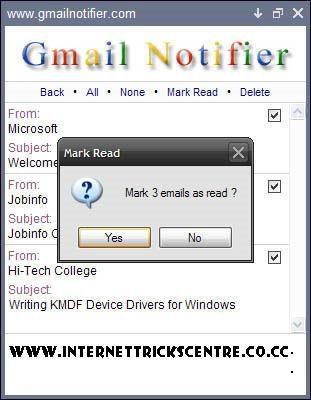
Tired of checking your Gmail ? Have more than one account ? Gmail Notifier is the perfect solution for you - and its free ! Gmail Notifier alerts you when you have new email messages in your mailbox. Also, you can read email headers, delete emails or mark them as read. Use Gmail Notifier to check up to 5 Gmail accounts.
Gmail Notifier gives you: * Counter of unread emails * Sound and tray icon alerts * Read email headers * Delete or 'Mark read' emails * Multiple accounts support * IMAP connectivity over SSL * Support for UTF-8 emails
And more: * 100% Spy and spam free * Auto version updates * Save window position * Make window topmost * Run at startup
Pure is an action sports off-road trick racing game that takes the genre to a new level. Developed by Black Rock Studio, Disney Interactive Studiosâ?™ award-winning development studio in Brighton, England, Pure is the next gold standard in off- road racing games. Featuring vertigo-inducing massive aerial jumps and spectacular airborne tricks in photo-realistic real- world locations all over the globe, Pure delivers heart-pounding experiences unique to the genre.
Pure encapsulates the moment where bravery outstrips ability â?“ it defines the moment in off-road racing when players experience breakneck speed, massive jumps, grandiose vistas and truly spectacular tricks and combos, all leading to unprecedented exhilaration.
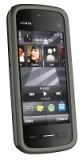
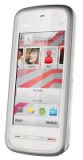
Nokia are obviously getting more and more serious about their touchscreen portfolio. Hot on the heels of the Nokia 5530 XpressMusic, they have announced the Nokia 5230 - an entry-level touchscreen handset. The newcomer has the same dimensions as the Nokia 5800 XpressMusic but looses the Wi-Fi and has only a 2 megapixel camera. Much like the Nokia 5800, the Nokia 5230 sports a 3.2-inch resistive touchscreen with a resolution of 640 x 360 pixels, FM radio, 3.5 mm audio jack and microSD card slot. The camera has been downgraded to 2 megapixel resolution but manages the decent VGA@30fps video recording. Nokia 5230 runs the latest Symbian S60 5th edition and is powered by the same battery as 5800 - a 1320 mAh one, which is good 320 mAh larger that that of the Nokia 5530 XpressMusic. According to the manufacturer the 5230 will be capable of 33 hours of non-stop music playback.
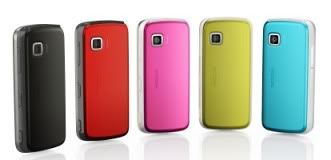
The final noteworthy features of the the 5230 include Ovi Maps and social networking integration such as Facebook, MySpace and YouTube.The available inbox colors for the Nokia 5230 are black and white for the front panel and red, pink, blue, yellow, silver and dark silver for the rear covers.The handset will be available in Q4 this year for a recommended price of 150 euro before taxes or subsides. It will also be distributed in a Comes With Music package in certain markets, priced at 259 euro before subsides and taxes. And here is a short promo video of the new handset, that underlines, what Nokia consider to be its key features.