Saturday, January 2, 2010

Make logo of ur email id and get rid from spamming !!

Thousands of time you surf diff. diff. blogs and leave you email id there so that others may contact you but you never knows that there are web data extractor, http://www.webextractor.com/ etc. which are alike of search engine robots but this extracters are made for particular purpose either to extract email ids from web and then sailing them 2 spammers or to extract phone no. Etc.


So there is a website which can protect you from it.
Visit ..

~!~ http://services.nexodyne.com/email/index.php

It is an online text to image generator, with the help of which you can create your own email logo. Now use this image while posting in blogs , Forums , chats etc.
Here is my email logo :o:


Source:http://gstek.info/forum/index.php?topic=885.0

ALSO VISIT :

1. http://gstek.info/forum/index.php?topic=937.0

2. http://gstek.info/forum/index.php?topic=540.0 FOR MORE PROTECTION FROMM SPAM :smile:

"Slick v 0.50" A free all in one IM (alpha version for testing) from LCG

Its currently supplied as freeware because it is in testing

Features:

~!~ Supported protocols: ICQ, Yahoo, AIM, MSN, Google Talk, Jabber

~!~ Emoticons Alerts: sound, backlight, vibration

~!~ Group and buddy management (add, delete, rename)

~!~ Message history ( as a text file )

~!~ File transfer - send and receive files ( not on all protocols )

~!~ Sending / receiving offline messages

~!~ Downloading files sent as links


Issues with Slick :

~!~ As slick is currently in alpha version so it tends to crash very often.
( But as my personal experience if you use only one protocol at a time then you hardly face any crash)


~!~ Sometimes the screen goes blank or the text get merged in one other but you can try my above
step to avoid this error.


Download: http://www.lonelycatgames.com/?app=slick

Direct download link for veersion 0.50:

http://www.lonelycatgames.com/download/slick/slick_symbian_lcg_0_50.zip

Hacking email accounts with phishing or fake login pages password stlealing

These days Hacking or better termed as password stealing or theft is on extreme.
so here is an article that how its done by Bad guys.


{.} Open www.jotform.com and Sign Up.
{.} then Login there with your newly registered account.
{.} now click on ‘ Create your first form’.
{.} Now delete all the pre-defined entries, just leave ‘First Name:’ (To delete entries, select the particular entry and then click on the cross sign.)
{.} Now Click on ‘First Name:’ (Exactly on First Name). Now the option to Edit the First Name is activated, type there “username:” (for Gmail) or YahooId: (for Yahoo)
{.} Now Click on ‘Power Tool’ Option (In right hand side…)
{.} Double click on ‘Password Box’. Now Click the newly form password entry to edit it. Rename it as ‘Password:’
{.} Now Click on ‘Properties’ Option (In right hand side…). These are the form properties.
{.} You can give any title to your form. This title is used to distinguish your forms. This Title cannot be seen by the victim.
{.} Now in Thank You URL you must put some link, like http://www.google.com or anything. Actually after entering username & password, user will get redirect to this url.(Don’t leave it blank…)
{.} Now Click on ‘Save’. After saving, click on ‘Source’ Option.
{.} Now you can see two Options, namely ‘Option1′ & ‘Option2′. Copy the full code of ‘Option2′.
{.} Now open Notepad text editor and write the following code their.
Paste the Option2 code here
{.} And now save this as index.html. And then host it, mean you will have to put it on the internet so that everyone can view it.

Now you can view it by typing the url in the address bar.

NOTE: If u want to send it to the internet, then first you will have to create a hosting account which you can create on www.110mb.com and there are many other sites which you can find on the internet very easily.

Name the login screen name like yahoo.com_mail_login.php?action=login&email=yes etc etc so that even if they look at the url, they don’t get suspicious, shorten your url with any short url provider
and give it some name that is similar to actual url.

lets suppose that you created your account at 110mb.com
now login to your account then click on “File Manager”, then click on “upload files” or just “upload”. Then select the file which you want to send to the internet and click on upload. And you are done.
Now you can access you file on the net by just typing the url of the file.
And you will receive password of the users that login to your site through email-id which you’ve entered while creating the form.


Now Place this website as home page at the victim’s computer, send him the link through email, trick them by saying that by using this site you can login fastly or without any problem etc and simply wait. If the user is not that much tech savvy for sure he is gonna end up prey to the login screen hacking.

See how simple is it constructing and set up a fake login screen and steal the password. Beware of such scam and be cautious while entering the password. Always look for the correct domain name while entering the password. Internet explorer 8 onwards will highlight the correct URL in a different color compared to other strings in URL.


If you are on a shared computer beware, the attacker can write in the windows host file and even make the URL as mail.yahoo.com. (How? In another post)

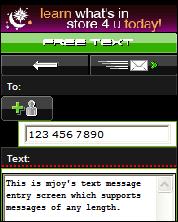
Unlimited character worldwide free sms mjoy.com new website with sender your no.

From a long time i was in search of a site which can allow us
to send UNLIMITED CHARACTER free sms and that too Unlimited
to any no. + Sender should be our mobile no.Not like this
Annoying sites like160by2 etc. and today came across to

"""MJOY"""

Which is really a chaos in the world of FREE SMS from internet....

Just visit the http://www.mjoy.com/
and choose your country then Enter your mobile no.

Registeration link [ Unqiue for your given mobile no. ] will
be send to your phone. just follow that and now you are ready
To ENJOY the MOST DECENT and ENJOYABLE FREE SMS service of this earth.


Things that stands MJOY Apart from the crowd
of useless and annoying add FLOODED free sms sites.


1. No character limit at all, Moreover your sms will be sent as one
sms not in parts [ in case if its more than 160 characters ]..

2. Support to send free sms to any operator in most of the countries..

3. Sender would be your registered mobile no. [ GREAT ]

4. extremly Tiny and bearable ADVERTISEMNT in last of every sms
[ if you sms in long than 160 than too only 1 ad in last :smile: ]

5. Full sms history of sent sms + you can add Contacts ..

6. Syncronise your mobile contacts live to your Mjoy account...


You can use M-alerts to Send unlimited free sms with sender as your no.!

Sunday, December 27, 2009

Computer Crash reasons

You may have heard of the ‘Blue Screen of Death’ but haven’t experienced it yourself. It is better to know the reasons behind this crash so that when it happens you are in a position to fix it. If you see on the screen “Fatal error: the system has become unstable or is busy”, “enter to return to Windows or press Control+Alt+Delete to restart your computer. If you do this you will lose any unsaved information in all open applications”. This is the infamous blue screen of death. This could happen due to any of these following reasons:

  1. Hardware Problem: Computer consists of different hardware such as Printer, mouse, flash drive etc. Windows assigns an IRQ number for each of these hardware. When due to some reasons more than one hardware use the same IRQ this will result in a crash. In order to find if you have any hardware conflicts you can goto the ‘Device Manager’ in your computer properties. (Start-Settings->Control Panel –> System->Device manager), an yellow exclamation mark will be placed against the hardware that has a conflict. You can resolve this by selecting the device, uninstalling and reinstalling it again.
  2. RAM memory: When you upgrade RAM memory, if you have two unmatched RAM cards or a RAM card that is not compatible with your motherboard, then a “Fatal Exception Error” will occur when you start the computer. If you are technically savvy then you may try to fix this by going to BIOS settings and editing the ‘Wait state’ of RAM or you can replace the cards with the same speed and capacity.
  3. Hard Disk Drive: After using the computer for a few months or years, the hard disk gets fragmented with temporary files, or fragmented files. This will result in slowness of hard disk and may even result in computer crash eventually. You can maintain your harddisk by defragmenting your hard disk frequently and deleting unwanted files.
  4. Video Card: If you see “Fatal OE exceptions and VXD errors” then it is due to the video card. To solve this reduce the video display resolution. You can do so by going to the control panel and display settings. Choose the correct screen resolution to match your monitor and change the color settings to 16 bit or match it with your monitor.
  5. Virus: Most of the computer crash is due to Virus infection in your computer. You should install or enable windows firewall and install an Anti virus application to prevent unwanted virus applications infecting your computer.
  6. Printer: Sometimes you may notice that the computer crashes whenever you try to print something. This is due to low memory buffer in the printer. Therefore when you send a lot of data to the printer or if you have multiple applications open and you print at the same time, this may happen. Unplug the printer from power outlet for 10 minutes and connect back again. Close other programs and try to print again.
  7. Software: If a particular software is not installed properly or is not complete then it may result in a crash when you try to start that software. You have to uninstall such software properly. Otherwise some entries may still be in the registry referring to that software and result in instability of the computer. You can use registry cleaning software to clean your registries frequently.
  8. Heat: Computers have inbuilt fans to cool down the processors. You can control the CPU speed from your BIOS settings. If the speed is set to higher than the normal CPU speed, this may result in overheating of the CPU which will result in Kernel Error.
  9. Power Supply: Use UPS to regulate the power supply to your computer. This will reduce the chances of your computer crashing.

18 million Gmail users in India

In a recent report published by ViziSense, Gmail has overtaken Yahoo in India. The total Gmail users in India is now 18,000,000 compared to Yahoo’s 16,800,000.

Yahoo has been the leader so far. However more and more Yahoo users have shifted to Gmail in the last two years. From August 2008, Yahoo users have been decreasing 8% each month where as Gmail users have been increasing 3% each month. In the first week of October Gmail has overtaken Yahoo.

Rediff mail is still 6,250,000 users and ranks third in India.

However in the global statistics, it will take a few more months before Gmail can take over Yahoo. In the global scenario, Yahoo is still the first while Windows live comes second and Gmail is still the third. However, globally gmail users are growing and unless Live and Yahoo mails introduce any new attractive features, Gmail is set to goto number one.