Thursday, November 26, 2009

Download YouTube Videos as MP4 Files

YouTube has changed the code and broke the script used for the bookmarklet. I updated the code, but you need to add the new version. Delete the old bookmarklet and add it again, following the instructions from the post. Like the initial version of the bookmarklet, it only generates a download link and it no longer starts the download automatically.

An interesting side-effect of YouTube's recent push for higher quality videos is that most videos can be downloaded as MP4 files directly from YouTube. Until now, you could only get FLV files from your browser's cache or using one of the many websites that let you download YouTube videos. In fact, to download the MP4 files, you need to use the same URL like for FLV files and append "&fmt=18":

http://www.youtube.com/get_video?video_id=ID&t=SIGNATURE&fmt=18

ID is the video's identification value, SIGNATURE is a value that prevents you from downloading the file just by knowing the ID. You could create this URL by looking at the source code of a YouTube page, but it's much easier to automatically generate it.

Add a bookmarklet

One way to download videos is to save the following link as a bookmarklet by dragging it to your Links bar (in Firefox, Safari) or right-clicking and adding it to your favorites (in Internet Explorer, Opera):


Watch the video below for more detailed instructions:


When you want to download a YouTube video, just click on "Get YouTube video" and the bookmarklet adds a small link below the video's description: "download as MP4". Click on that link and you'll download the video. For some videos, you'll also see the option to download the HD version.

The bookmarklet only generates a download link and it no longer starts the download automatically.


By the default, all the videos are saved as "video.mp4", "video(2).mp4" or similar names. If you want to use a different name, right-click on "download as MP4" and select "save target as" or "save link as", depending on your browser.


Install a Greasemonkey script

Clicking on the bookmarklet to get the download link may be annoying, so this Greasemonkey script is a better alternative because it adds a download link automatically.


To add the script, you need to install the Greasemonkey extension for Firefox or a similar plug-in for userscripts. Opera has built-in support for userscripts, so you only need to go to Tools > Preferences > Advanced > Content > JavaScript options, select the directory where you will put your script and copy the script to that directory.

YouTube's MP4 files have a higher resolution, stereo sound and can be played with applications like VLC, MPlayer, iTunes, QuickTime. Not all YouTube videos can be downloaded as MP4 files and the fallback format is FLV.

Note that YouTube's terms of use require you "not to access User Submissions or YouTube Content through any technology or means other than the video playback pages of the Website itself, the YouTube Embeddable Player, or other explicitly authorized means YouTube may designate," so these scripts could break YouTube's policies. The scripts only download files that are used by YouTube's player, so you may also find the videos in your browser's cache.

Update: You no longer have to right-click and select "save link as" because YouTube sends the right MIME type. Just click on the download link.

Update 2: If the video is available in HD, the script shows the download link for the HD version. Thanks, pepemosca!

Update 3 (Oct. 31, 2009):

I updated both the script and the bookmarklet. There are two changes:

1. If the HD (780p) version of a video is available, you'll see a separate link for that version.

2. The bookmarklet no longer starts the download automatically. It only adds the download links. This way, you can download either the standard version or the HD version and you can also pick a name for the file (right-click, select "save target as..." or "save link as...").

Google Released Page Speed for Firefox

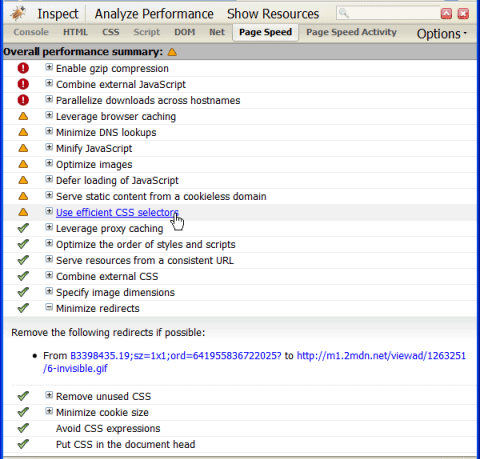
Google just released a Firefox/Firebug add-on called Page Speed. It is basically a tool that will help you improve the loading performance of your website. After you run it, you will see a list with all the factors that would make your site load faster, with an image illustrating whether or not your website checks for each.

page speed

There are some similar plugins available for Firefox, but this one seems to be more robust. It checks for a wide range of optimization steps, including proxy caching, DNS lookups, CSS combination, Javascript loading and parallel downloads. Worth a try.

100+ Download Sites

Today we published one titled 100+ Sites to Download All Sorts of Things. It is basically a list of sites that you can use to download stuff, including:

  • Audio Books
  • BitTorrent
  • Books and Documents
  • eBooks
  • Clipart
  • Freeware
  • Flash Files
  • Fonts
  • Games
  • Movies
  • MP3
  • Online Video
  • Photoshop and Design
  • Sound Effects
  • System utilities

If you like the post please help to spread the word by bookmarking it on Delicious or by Stumbling it.

Fring – Talk, chat and send files between mobiles phones for free

I’ve been reviewing a lot of free mobile phone services lately, most of which allow you to install applications on your phone that can connect you to other mobile users and to your PC. If you have a cell phone with an unlimited data plan, it’s absolutely necessary that you take advantage of these services!

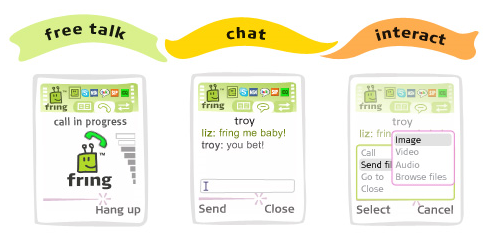
Fring is a mobile phone application I came across recently that basically joins multiple mobile services into one! You can chat with all of your IM buddies (instead of using SMS) from all the different networks, including MSN Messenger, Google Talk, Yahoo Messenger, AIM, ICQ, Twitter, SIP, and more!

fring

Not only can you chat for free, you can also make calls using Skype to any of your Skype contacts for free! This is great because you’re basically using your Internet connection bandwidth rather than costly airtime minutes.

If you have an unlimited data plan, you can talk to people all day and night and not have to pay anything extra. If you’re calling people who are not using Skype, you can still make local and International calls, but for a very small charge.

Another cool feature of Fring is that you can easily send and receive files between friends, including photos, MP3s, and videos.

free mobile talk

However, the best part about Fring is the fact that you can make calls, chat, and send and receive files without even having an Internet plan as long as you can connect via a Wifi network. So, for example, if you own a phone that does not have an Internet plan but that can connect to wireless networks or WiFi hotspots, Fring will detect and auto-connect your mobile device to wireless networks that you’ve previously logged into.

Once you’re connected, you can then make calls using Skype, chat and send and receive files without consuming any of your carrier data or phone plan. You could even remove your SIM card and Fring would still work as long as you’re connected to a free WiFi network. Fring creates a peer-to-peer VOIP connection between calling parties, enabling true VOIP sessions between fring enabled handsets and also between handsets and PCs.

You can check out how much you can save between using a traditional mobile network and the 3G/EDGE/GPRS Internet data plan:

data plans

In order to use Fring, you need to have an applicable 3G or Wi-Fi Symbian 8 or 9, Windows Mobile 5 or 6, and UIQ handsets with 3G/GPRS/Wi-Fi network coverage. They support most of the popular phones and when you sign up, you have to choose your phone from the list.

Once you sign up, you’ll get an SMS with a link to download the fring application to install. Overall, it’s super easy to use and has a ton of great features for hardcore mobile users who like to stay connected. It’s free, so there’s no reason to not try it out or have it as a backup in case you ever need it. Enjoy!

[tags]fring, mobile phone chat, send files from mobile, free skype calls on mobile, talk for free[/tags]

Wednesday, November 25, 2009

Share files between any two computers easily using Gbridge

Looking for a free and easy way to create a VPN connection to another computer, share files, remote control or share screens between computers? Previously, I’ve written about another freeware app called Hamachi that you can use to create your own personal VPN, but I find it still requires a little too much technical knowledge that a newbie may not have.

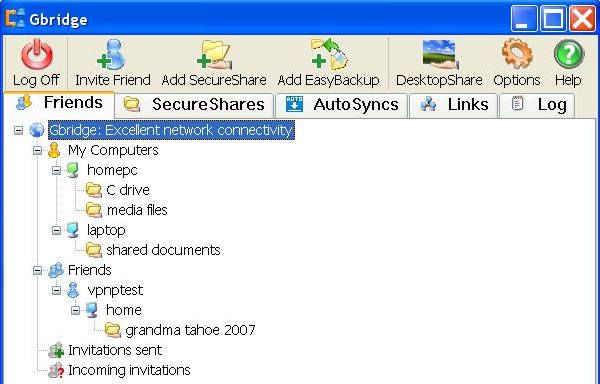
That’s where Gbridge comes in. Basically, Gbrdige is a free tool you can use to sync folders, share files, control another computer, share your desktop, or chat. It connects two computers directly and securely.

gbridge

Other programs do something very similar like CrossLoop and LogMeIn: download a client software, create an account, and connect to another computer running the client software.

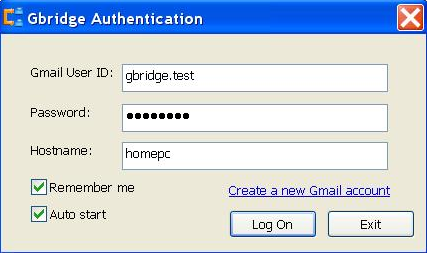
Gbridge does the same thing, but has a couple of interesting features. Firstly, you do not have to create an account with Gbridge, all you need is a Gmail account. You log into the program using your Gmail username and password.

share large files

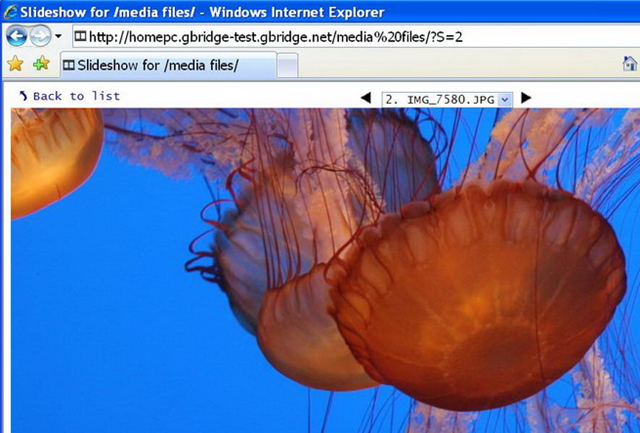
So if you want to quickly connect to a friends computer, just ask them to install the Gbridge client software and you can now send large files, instantly play MP3’s off each other’s computer, share your desktops, and even create photo slideshows from your folders and let others watch.

slideshow

Gbridge also has some cool tecnhonolgy to make sure two computers can be connected even through firewalls and routers. It will try multiple ways to connect based on what works and which method is giving the highest performance. As a last resort, it can use GTalk to create a connection on top of the service.

This is great because you can be behind a corporate firewall or a NAT device and not have to configure a single thing. For those who want to connect two computers in a house or across the world, Gbridge will be able to do it.

Overall, it’s a great program with a lot of features and no restrictions! You can share very large files without a problem, share your desktop, and stream music and video to your computer from another.

What programs do you use for file sharing and remote computer control? Share in the comments! Source: FreewareGenius

Create HTML email signatures for Hotmail, Gmail, Yahoo Mail

Most people know how to create email signatures for programs like Microsoft Outlook because it’s easy, however, creating professional HTML email signatures for online email services such as Gmail, Hotmail, and Yahoo Mail is a real pain.

If you use Firefox, you can either install Greasemonkey and use the script I mentioned above or you can check out a cool Firefox

add-on called WiseStamp that not only works with Gmail, but also with other email service providers, such as Hotmail, Yahoo Mail, AOL Mail, or any other webmail service! Now that’s definitely much nicer.

wisestamp

WiseStamp has a lot of cool features that make it the best add-on I’ve come across so far for creating and adding email signatures. Here’s a quick overview of the program:

  • Personally design email signatures
  • Easy to use GUI interface for creating signatures

create html email signatures

  • Rich Text WYSIWYG editor
  • Ability to add a logo or graphic to your signature
  • Supports all web email services and all webmail functions such as Compose, Reply, and Forward
  • Include your IM icons and ID’s into your signature easily
  • Add links to all your social networking services like LinkedIn, Facebook, Twitter, etc
  • Supports special characters
  • Supports LTR and RTL languages also

create email signature

The other cool thing about WiseStamp is that it has a whole bunch of email signature templates that you can download and just replace with your information! It’s great because they have created some very professional looking signature templates, so you can start including great looking signatures in a few minutes!

Overall, the add-on is one of the best for generating email signatures. I wish it worked in Internet Explorer also, but as of right now it does not. Enjoy!

Password protect programs and EXE files with Empathy

Well, for lots of reasons! For example, maybe you have TurboTax installed on your computer, which does not have any built-in security, and you have other people who might use that computer. You certainly don’t want someone to be able to open TurboTax and see all of your financial information right!?

Currently, the only way to prevent someone from accessing that program would be to create another user account and secure your account with a password. However, there are always times when you just happen to forget to log off your account and someone comes along and sits down to use the computer.

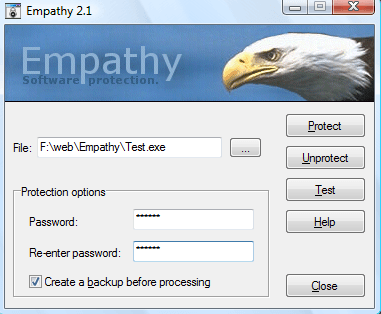
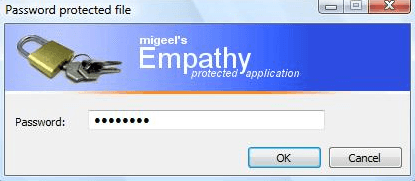
Empathy is a cool program that allows you to password protect Windows programs and EXE files. It can modify any EXE file so that it will require the user to enter a password before it can be run. This is fabulous for someone like me.

Now I can password protect my FTP program, my financial programs, my chat applications, etc to add additional security on top of passwords and prevent other people from accessing my data and sensitive software.

password protect programs

The other cool thing about the program is that if you copy or move the EXE file to another location or even to another computer, the password will still be required, even if the operating system

is different! Now that’s pretty cool!

This is also a great utility for portable apps that you might have on your USB drive. Sometimes you end up having to let someone borrow your USB stick, which means your data could be accessed, even if you have passwords setup. Using Empathy, you can password protect your portable apss also in case you have to lend out or you end up losing your USB stick.

password protect exe

The protected files can be run on Windows NT, Windows 95, Windows 98, Windows ME, Windows 2000, Windows XP, Windows 2003, and Windows Vista.

The only strange thing about the program is that when you download the program from his website, the unregistered version only allows you to use one letter to password protect a file.

In order to register the software, you have to send a postcard to the developer with your email address and a picture! That is the first time I have ever heard of anything like that before, but apparently once he gets the postcard, he will email you the registration code that will allow longer passwords! Enjoy!

Watch TV shows, HBO, and sports online for free

One of my most popular articles on this site over the last two years has been on how to watch DivX Hollywood/Bollywood movies online for free. People are always looking for ways to watch movies, TV shows, sporting events, etc for free.

Most people end up using Torrent sites to download movies, download TV shows, etc and then watch it on their computers or stream it to their TVs. However, it would save lots of time and bandwidth if you could just stream it to your computer.

StreamTorrent is a nifty little application for Windows that is designed to stream TV channels over the Internet, such as HBO, ESPN 360, BBC One/Two, Fox Sports 2, and lots more.

stream tv channels

Basically, the application is kind of like a BitTorrent client like uTorrent, allowing you to watch a TV show or premium channel by streaming it to your computer from other users or “seeds”.

The more seeds that are available, the more likely you will get to watch a particular TV channel. There are several columns in the program that you can sort by to quickly be able to choose the highest quality and most available channels. The higher the bitrate, the better the image will look.

You can also use the search bar at the top to either browse through a list of pre-defined categories, such as sports, news, Top 100, and more. You can also enter a keyword into the search bar if you’re looking for an exact match.

When you click on a channel, a small viewer will pop up and your video will begin loading. It takes a bit of time for the TV channel to load, but most of them do eventually.

stream tv shows free

The program has a good range of sports channels also, including CCTV 5, ESPN, ESPN China, ESPN HK, ESPN TW, MLB TV, Eurosoccer, Zee Sports, Zenit TV, STS Sport, and more.

It’s not the greatest program in the world, but if you are really strapped for bandwidth or time or money, this might be a worthwhile way to watch some sports, TV shows, or movies for free! Enjoy! [via gHacks]

10 Free Essential Programs for Windows

After reading the title, you may think to yourself, “Only ten? There are hundreds, perhaps thousands, of free programs for Windows.” This thought would be difficult to disprove as there are vast numbers of freeware programs available for the Windows operating system. This is simply short list of ten programs that will prove helpful when working with the Windows platform.

1. Firewall: Sunbelt Personal Firewall. This program can be found at Sunbelt’s website. It is easy to setup and does not consume too many system resources. A good firewall is an essential piece of security all computers need, and this one fits the bill for Windows. Additionally, when it asks you for permission to allow or deny a connection to something, it will remember your choice. There are other firewalls that suffer from memory problems when you instruct them to block a service, only to forget and ask you again at a later date.

2. Anti-malware: Microsoft Security Essentials. Even though it is not officially released as yet, Microsoft Security Essentials (code name: Morro) does quite well even as a beta product. Though the downloads have been cut off at the Microsoft Connect website, it can still be found at softpedia.com’s website. While some people may be apprehensive about using a Microsoft branded security product, Security Essentials has come a long way from the initial offering of Windows Defender from years past.

3. System Cleaning: CCleaner. A Windows computer builds up temporary and useless files daily with normal use. Surf the Internet, get temporary Internet files. Install and uninstall programs, your computer has leftover files that did not get removed. There are also other programs like Windows Update and Microsoft Office, which produce unneeded files periodically. CCleaner runs through Windows, and flags the excess files for removal. The user is able to select what that want to remove, or keep, and let CCleaner do the rest.

4. Search Tools: Google Desktop. Your three year old computer may not be as uncluttered as it used to be. Thousands of digital pictures, emails and other files later, it can be daunting to find things. Luckily, Google Desktop is there to help locate what you are seeking. Putting the power of the Google Search engine on your computer, and after it finished its initial indexing routine, finding files is much faster than clicking through folder after folder, or using Windows Search.

5. Image Editing: Paint.NET. When you need something better than MS Paint, balk at the price tag of Adobe products, and are overwhelmed by programs like the GNU Image Manipulation Program (GIMP), there is a third option. Paint.NET is light on system resources, but plenty of options for good image editing. The authors also have a message board and tutorials on their website for those who want to get further information on their software.

6. File Compression: TugZip. With the ability to compress to and extract from a sizeable list of compression formats, TugZip is a freeware must have for anyone needing a program for making ZIP type files. TugZip adds a list of formats to the Windows right-click menu, making the compression of a file or folder a simple two step operation. Additionally, TugZip gives the user the ability to create encrypted archives so they can safely store there computer files, without too much complexity.

7. Instant Messaging: Trillian. Having been available since 2001, and going through many updates, Trillian has place itself as an excellent tool for replacing brand specific instant messengers. By combining services like MSN Messenger, AOL Instant Messenger, and Yahoo Messenger, Trillian eliminated the need to run separate IM programs. It also covers the social networks of Twitter and Facebook, for posting; as well as the ability to tie into Skype.

8. Download Tool: Download Accelerator Plus. Though this software is Ad Supported, it is free. Accelerator Plus can greatly boost your file download times by attempting to get the data from multiple sources on the Internet. This program also has the ability to resume downloads if your connection experiences interruption, or the originating file location has issues.

9. Disc Burning: Ashampoo Burning Studio Free. When it comes to burning CDs and DVDs, the easier the program, the better. With a friendly graphical user interface, and a step through process for burning disc media, Ashampoo Burning Studio Free answers the call of the need for disc creation software at a practical price (free). This program can also create ISO files for those of us who need operating system discs; as well as other specialized disc formats.

10. File Restoration: Recuva. Made by the same group as CCleaner, Recuva helps people get back lost files. Whether you emptied the Recycle Bin, or pressed the Shift+Delete key combination with files highlighted, Recuva scans your hard drive(s) and looks to see what is still recoverable, and what is not. It does an excellent job of file recovery considering the price tag, free.

Top 5 sites to download free software

In the course of the last few years, there have been a few great web sites that have stood out as trusted resources for downloading free software legally. Let me list the top 5 sites that offer this service, so you can use them as resource:

1. Tucows.com – tucows earned its reputation as one of the original free download sites. Now with over 40,000 software titles, it is a very dependable resource for free software with software reviews and ratings. It has minimal ads on the banner, but they are not distracting. Tucows, like MTV, might sound outdated by the savvy downloaders of today but still packs a powerful punch when it comes to providing free software.

image

image

2. Download.com – Featuring editor and user-rated reviews, Download.com is the trusted, safe, and secure resource for software, mobile applications, and game downloads.

With everything from PC starter kits to games, security patches, screensavers, and mobile apps, you can download more than 80,000 free programs.

image

Download.com has a good reputation for unbiased software reviews and ratings system.

image

My only gripe with download.com is that it doesn’t review software that falls under these categories: corporate security, drivers, and networking software. If you are interested in those categories, you will need to go to other places to get reviews.

3. Sourceforge.net – unlike the sites mentioned above, Sourceforge.net offers services that help people build cool applications. The best thing about Sourceforge is that you get the source code of the application and not just the installer.

Programmers could easily tweak the source code to fit their needs and distribute in accordance with the softwares’ license agreement. This is a good place to look for script based apps like PHP/MYSQL projects, Python scripts, home brewed software and also community developed applications.

image

4. Filehippo.com – this web site is perhaps the most Spartan of all. The main page contains tabular lists per category of software so anyone who feels like downloading an app will see what’s hottest instantly. Filehippo focuses on hosting quality freeware – there are no reviews or rating system – just the link to the file with descriptions about the software and some technical details.

image

5. Snapfiles.com – this one you may have not heard of or seen yet, but it offers good selection of software and reviews for both shareware and freeware categories. Visitors could post their own reviews of their favorite software so don’t be surprised if you find over-the-top un-objective reviews like the one below:

image

image


Change the default search engine in IE via reigstry

Change the default search engine in IE via reigstry


If you are under a corporate network that has its own implementation of IE settings – most likely your default search engine is Live Search (now called Bing). You can verify this by opening IE and entering a search term in the search box at the upper right side of the IE window.

In the example below I typed “utah jazz” and the result comes out at the main part of the IE window:

image

image

How to find files on LAN

How to find files on LAN

If you are looking to search/find shared files on LAN (Local area network) properly, check out LAN search pro. It’s a nifty utility that lets you search files across your local area network easily. You can search for any specific file name or through a extension (like Movies or Pictures). With LAN search pro, you can search for hidden network resources, restricted access resources, IP subnets, LAN FTP servers etc very fastly.

With all that, you can also copy, move, rename the files that you find through LAN search. Features include:

  • Result sorting
  • Filtering
  • Export
  • Search within results
  • Command line switches support

And more.

Download LAN Search Pro

Tuesday, November 24, 2009

Windows Vista 64-bit and Windows Server 2008 Service Pack 2 (final release)


Applies to:
Windows Vista 64-bit or Windows Server 2008

Requirements
Windows Vista 64-bit (32-bit versions) with Service Pack 1 installed or
Windows Server 2008 with Service Pack 1 installed

File Size
745MB

File Name
Windows6.0-KB948465-X64.exe

Author/Supplier
Microsoft

[Click here to Download]

Description
Windows Vista 64-bit Service Pack 2 (also called Vista SP2) fixes a range of bugs in Windows Vista discovered since the release of Vista Service Pack 1. The download provides enhanced security measures that will improve Vista's defences against viruses, worms and hackers, along with increased stability and, fingers crossed, an improved experience for users.

Windows Vista 64-bit and Server 2008 Service Pack 2 is a large download and can be applied to any 64-bit version of Windows Vista or Windows Server 2008, provided Service Pack 1 has already been installed. You can download SP2, burn it to disk and use it on multiple PCs.

Important notes:
  • This is the final version released in May 2009.
  • Service Pack 1 is a pre-requisite for installing Service Pack 2.
  • This service pack can also be applied to Windows Server 2008 (The operating systems already shipped with Service Pack 1)
  • To download Service Pack 1 - which is needed before you can install for SP2 - head to the Windows section of this site (see the menu on the left).
  • The file will download directly from Microsoft's servers.

Windows XP Service Pack 3: XP SP3 (final release)


File Size
316MB

File Name
WindowsXP-kb936929-sp3-x86-enu.exe

Author/Supplier
Microsoft

[Click here to Download*]
*Service Pack 3 does not include all drivers - run this free scan to find which ones need updating.

Description
Windows XP Service Pack 3 (XP SP3) fixes a range of bugs and adds new features to Windows XP. The file is a large download and can be applied to any version of Windows XP Home, Professional, TabletPC or Media Center (32 bit only). However, you must have installed either Windows SP1 or SP2 before SP3.* Keep in mind that new patches made available after Service Pack 3 was released (mid April 2008) will still need to be applied.

Important notes: Microsoft advise uninstalling any beta or Release Candidate versions before installing this final release. Do not install Service Pack 3 on systems with AMD chips unless a special hotfix has been applied first. This hotfix needs to be applied before SP3, otherwise your system may get stuck in a loop and never start. Click here for the AMD Windows XP SP3 hotfix. The file will download directly from Microsoft's servers - you may want to shorten the file name.

The advantage of this full download is that it can be used on any system - plus it doesn't require an Internet connection to install. You can download SP3, copy it to disc or a portable drive and use it on multiple PCs. Alternatively, since the file is so huge, you can download SP3 on a fast Internet connection and use it to update a PC with a slow or non-existent connection.

Windows XP Service Pack 3 (SP3) includes the following:
  • All previous security patches and fixes released for Windows XP.
  • All enhancements and new features that were included with Windows XP SP1 and Windows XP SP2
  • Only two new features have been added: Black Hole Router Detection Windows and Network Access Protection (NAP).
  • The following are already available for Windows XP in stand-alone updates. Windows XP SP3 includes them by default (System administrators must choose to install each of these updates): MMC 3.0, MSXML6, Microsoft Windows Installer 3.1 v2, Background Intelligent Transfer Service (BITS) 2.5, IPsec Simple Policy Update for Windows Server 2003 and Windows XP, Digital Identity, Management Service (DIMS), Peer Name Resolution Protocol (PNRP) 2.1, Wi-Fi Protected Access 2 (WPA2).
  • From the Release Notes: "Microsoft is not adding significant functionality from newer versions of Windows, such as Windows Vista, to Windows XP through XP SP3. For instance, Windows XP SP3 does not include Windows Internet Explorer 7, although Windows XP SP3 does include updates to both Internet Explorer 6 and Internet Explorer 7, and it will update whichever version is installed on the computer. One notable exception is that, SP3 does include Network Access Protection (NAP)."
  • *This next bit is going to get confusing. Microsoft stopped supporting the early releases of Windows XP. You can't apply SP3 unless you have, at bare minimum, Windows XP SP1a. However, Service Pack 2 includes all of Service Pack 1a. So... if you have Windows XP original (with no Service Pack), you must install Service Pack 2 first, followed by Service Pack 3. If you have either Windows XP Service Pack 1a or Service Pack 2 already on your system, you can install Service Pack 3 now.
To download the complete 313MB SP3 for all English versions of Windows XP, click the download link at the top of this page.

Sunday, November 22, 2009

Backup Important Data With Backblaze

Backup Important Data With Backblaze

So you’ve set up a system restore point and backed up all your files onto a separate hard disk partition. By now you must be feeling pretty secure about your files and data. Say it’s a laptop you’re using; you’re travelling with it and it gets stolen; you’ve lost your data. If it’s a desktop, there’s a fire and the insides of your computer melt; again, you’ve lost your data.

Backing up your data on your PC is a great way to prevent data loss due to the operating system failure but it can never ensure security from physical threats to your computer. In that situation, Backblaze comes into play.

backblaze


Backblaze is the best insurance for your data. The service offers you to store all your data online for $5/month. Since there are no size limitations, you can keep on saving whatever you want, for as long as you want, provided you meet the payment conditions. Keeping in mind that you’re paying for the safety of all your data, $5/month seems like a perfectly economical figure.

They also offer 3 types of restore options. Either you can Download any files you need over the Internet for free, Or order your files on a DVD ($99) or USB drive ($189). Though, I would suggest that you should simply download the files.

Before deciding to go with Backblaze you can give the free 15 day trial a go from here.

Backblaze truly is the best and most secure way to store your data and ensure its longevity.

Google Wave Invites GiveAway


Google Wave Invites GiveAway

Hi Guys, once again, another give away. I have 5 Google Wave Invites on me and I’ll be giving those away here. What is google wave? Check this video out :

To enter, Subscribe to our feeds and comment here with your email address and I’ll send 5 people the invite this Sunday night.

Paint Your Room Online With ColorJive

Paint Your Room Online With ColorJive

Confused about what color to paint your room? So many colors to choose from, so many possibilities. And such a high risk involved. What if you aren’t satisfied with the results? Would you undergo the process again and spend all that money? So, what to do?

ColorJive, that’s what! ColorJive is a free online service that lets you upload pictures of your room and then provides you with very easy tools to see how the room would look with a different paint color!
ColorJive

You can keep on trying your color combinations till you find one which suits your tastes. You can safely pick that color with all your fears removed.

That fact that ColorJive is free makes it even better. And as if that was not enough to impress users, ColorJive requires no registration whatsoever! (However, if you would like ColorJive to save the pictures you modify, then you will need to register for a free account.)

So the next time it’s time to paint a room or area in your house, don’t forget to use ColorJive before you decide a color – it could save you valuable time and money!

Increase Youtube Speed

Increase Youtube Speed

Depending on your internet connection, you sometime cannot watch Youtube Videos with full speed because of interruptions etc. There’s a small trick for Firefox users that can help increase youtube videos streaming speed. You need a small grease monkey script called “Buffer Youtube Video”, what it does is disables the autoplay video function of opening page and helps in buffering the video in full speed by avoiding those definitive breaks and let you stream the video fine. Here’s what you need to do.

1- Download Grease Monkey for FireFox (Here) and install it. (Restart FireFox)

2- Download Buffer Youtube Video script for Grease Monkey (Here or Direct Install), install it and restart firefox again.

After all that, stream a youtube video and you’ll feel the difference yourself. I hope it helps.

TeamViewer 4.1.6911

TeamViewer 4.1.6911

TeamViewer is an excellent screen-sharing and file-transfer app that can be used to facilitate business collaborations as well as helping distraught relatives diagnose and cure computer problems. Along with being free for noncorporate use, it gives users precisely the tools they need to share screens securely, send files with a minimum of hassle, control access rights, and even flip which user has control.

The options available while you're in control work smoothly. You can maximize the pane that the other computer's screen is visible in, as well as utilize several smart options from a drop-down toolbar in the center of the window. A big X lets you close the connection, while the Actions button lets you switch whose in control, disable remote input, and reboot remotely. The View menu hides options to adjust the screen resolution, the optimization toward speed or quality, and control multiple-monitor displays.

When you log in, you're given an access code and a password. Sharing those allows your computer to be controlled by the level you set it to: remote support, presentation, file transfer, or VPN. The TeamViewer servers remember which computers you've connected to, so reconnecting to previously shared computers happens faster. TeamViewer also has a Web-based version, for remote connecting to home from public computer. Even the installation process is impressive. Users can toggle admin rights, can opt out of running at startup, and can opt into installing the TeamViewer VPN driver for more secure screensharing. Overall, TeamViewer makes screensharing and file-sharing as fluid and unobtrusive as it should be.


Download Now (2.18MB)


Vuze 4.3.0.4

Download Vuze 4.3.0.4

Vuze 4.3.0.4

Azureus - 7.81MB


Vuze (formerly Azureus) is a free BitTorrent client used to transfer files via the BitTorrent protocol. Vuze is written in Java, and uses the Azureus Engine. Vuze offers multiple torrent downloads, queuing/priority systems (on torrents and files), start/stop seeding options and instant access to numerous pieces of information about your torrents.

In addition to bittorrenting, Vuze allows you to view, publish and share original DVD and HD quality video content. You can see content through channels and categories containing TV shows, music videos, movies, video games and others.

If you publish your own original content through Vuze, you can charge for it and make money.

Please note: You must have Java installed to be able to run Vuze.


Download
Latest Version

7.81MB

uTorrent 2.0.0 Beta 17341

Download uTorrent 2.0.0 Beta 17341

uTorrent 2.0.0 Beta 17341

Ameer- 307KB (Freeware) - beta


µTorrent is a small and incredibly popular BitTorrent client.

Micro-Sized Yet Feature Filled

Most of the features present in other BitTorrent clients are present in µTorrent, including bandwidth prioritization, scheduling, RSS auto-downloading and Mainline DHT (compatible with BitComet). Additionally, µTorrent supports the Protocol Encryption joint specification (compatible with Azureus 2.4.0.0 and above, BitComet 0.63 and above) and peer exchange.

Resource-Friendly

µTorrent was written with efficiency in mind. Unlike many torrent clients, it does not hog valuable system resources - typically using less than 6MB of memory, allowing you to use the computer as if it weren't there at all. Additionally, the program itself is contained within a single executable less than 220 KB in size.

Skinnable and Localized

Various icon, toolbar graphic and status icon replacements are available, and creating your own is very simple. µTorrent also has support for localization, and with a language file present, will automatically switch to your system language. If your language isn't available, you can easily add your own, or edit other existing translations to improve them!

Actively Developed and Improved

The developer puts in a lot of time working on features and making things more user-friendly. Releases only come out when they're ready, with no schedule pressures, so the few bugs that appear are quickly addressed and fixed.


Download
Latest Version

307KB

Download Any Video Converter 2.67

Download Any Video Converter 2.67

Any Video Converter is an All-in-One video converting tool with easy-to-use graphical interface, fast converting speed and excellent video quality. It allows you to effortlessly convert video files between every format! It can convert almost all video formats including DivX, XviD, MOV, rm, rmvb, MPEG, VOB, DVD, WMV, AVI to MPEG-4 movie format for iPod/PSP or other portable video device, MP4 player or smart phone. It also supports any user defined video file formats as the output.Any Video Converter makes it easy for anyone to enjoy the any format video with your iPod, PSP, mobile phone or MP4 player.

The following 2 changes has been made in the newer version

  • Fixes bug concerning the YouTube video downloading error.
  • Fixes bug concerning the gdiplus.dll does not exist for Win98/Win2K.

Download Any Video Converter 2.67

Adium 1.3.3 RC1 for Mac OS X

Adium 1.3.3 RC1 for Mac OS X

Adium is an excellent Chat Client for Mac OS X. It supports all the major messenger services like

  • AOL Instant Messenger (Including ICQ and .Mac)
  • Jabber (Including Google Talk)
  • MSN Messenger
  • Yahoo! Messenger (Including Yahoo! Japan)
  • Bonjour (Compatible with iChat)
  • Gadu-Gadu
  • Novell Groupwise
  • Lotus Sametime

Adium 1.3.3 RC1 Changelog

  • OTR Encryption
  • Tabbed Messaging
  • File Transfer
  • Webkit Message Display

Download Adium 1.3.3. RC1

AnyDVD & AnyDVD HD 6.5.2.0 Beta

AnyDVD & AnyDVD HD 6.5.2.0 Beta

AnyDVD works in the background to automatically remove the copy protection of a DVD movie as soon as it’s inserted into the drive, allowing you then to backup the movie using a DVD backup tool such as CloneDVD and CloneDVD mobile.You can also remove the RPC region code, thereby making the movie region free and viewable on any DVD player and with any DVD player software.
AnyDVD is capable of removing unwanted movie features, including subtitles and prohibition messages such as copyright and FBI warnings. It also allows you to launch an external application whenever you insert or remove a disc, or prevent ‘PC-friendly’ software from automatically launching when you insert a video DVD.

Download AnyDVD & AnyDVD HD 6.5.2.0 Beta

Flexcrypt 2.7.0

Flexcrypt 2.7.0

Flexcrypt is a smart encryption toolbox offering 5 different encryption options; Text, Email, Files, MSN and ICQ. It is possible to encrypt and decrypt Texts and Files Online , for automatic Email, MSN and ICQ encryption, Flexcrypt must be downloaded and installed.

Flexcrypt is developed to meet the encryption needs of private users and is True-free, no hidden charges or limited test period. Professional users must purchase a Biz or Pro version.

Flexcrypt Free is an easy way to get to know the Flexcrypt software at no cost.

Once you’ve seen what Flexcrypt can do and experienced its simplicity, you can upgrade to Flexcrypt Biz or Pro to take advantage of safe, encrypted communication with a greater number of recipients and other extra features.

Download Flexcrypt 2.7.0

CCleaner 2.16.830

CCleaner 2.16.830

CCleaner (formerly Crap Cleaner) is a freeware system optimization and privacy tool. It removes unused and temporary files from your system – allowing Windows to run faster, more efficiently and giving you more hard disk space. The best part is that it’s fast! (normally taking less than a second to run) and Free.

CCleaner 2.16.830 changelog includes

  • Google Chrome v2.0 compatibility fixes.
  • Improved Firefox support when browser is open.
  • Improved SeaMonkey support.
  • Added Publisher to the uninstall tool.
  • Many translation updates.
  • Several updates to installer code.
  • Cookie options loading now fully threaded.
  • Lots of minor interface improvements.
  • Minor performance improvements.

Download CCleaner 2.16.830

Google Chrome 2.0.159.0

Google Chrome 2.0.159.0

Google Chrome is a browser that combines a minimal design with sophisticated technology to make the web faster, safer, and easier. It has one box for everything: Type in the address bar and get suggestions for both search and web pages.Google Chrome will give you thumbnails of your top sites.

Access your favorite pages instantly with lightning speed from any new tab. Google Chrome is an open source web browser developed by Google. Its software architecture was engineered from scratch (using components from other open source software including WebKit and Mozilla Firefox) to cater for the changing needs of users and acknowledging that today most web sites aren’t web pages but web applications. Design goals include stability, speed, security and a clean, simple and efficient user interface.

Download Google Chrome 2.0.159.0

How to create your own flash website online

How to create your own flash website online

I have been a big big fan of flash websites since forever. There was a time when I tried learning it myself and trust me, I had the best time building up my own cartoon characters and making short films on Flash.

Now that Wordpress and Blogspot has taken over the web, there aren’t much people left who design flash websites just for fun anymore. For those of you who have no idea howyou can still design an awesome flash based website without having the knowledge of the whole flash concept should check out WiX.

It’s a great web-based service that allows you to make your own free stunning flash website. To start building your flash website, register here and once you’re logged on click “create”

You will see a list of ready made templates and a blank website where you can start your own thing totally from the scratch. You can even choose the size of your page. Available dimensions are 1000×650, 300 x 400, 400 x 300, 800 x 250 and 2500 x 600.

Once you get to the starting page of your new website, you will get the option to add text, pictures, music and videos. In addition to that you get

- Easy to use drag and drop editor
- Easy to customize, modify and update
- Your complete design, publish and hosting solution
- Create anything you like: add photos, videos, music and more
- Search Engine Friendly
- No programming required

Play around with it, there are thousand of things you can do with it. Here’s something I made in about 60 seconds. The cool thing is that you can always publish your flash pages on your websites as well. For some reason it didn’t fit on my blog properly so you can check it out here.


Here is the list of pages where you can publish your flash website directly from Wix.com

Start creating your own flash website